

Now Reading: Spotify Full-Length Videos: The Complete Guide for Artists (2026)
-
01
Spotify Full-Length Videos: The Complete Guide for Artists (2026)


Can full-length videos on Spotify help you get more streams?
According to Spotify’s data, the answer is yes.
The company recently expanded its video offering by allowing eligible artists to upload full-length videos directly through Spotify for Artists. Instead of relying solely on distributors or label partners, many independent artists can now manage videos themselves.
This is more than another feature update. It’s part of Spotify’s larger strategy to keep fans engaged inside the platform, giving artists another way to deepen listener relationships without sending them to YouTube.
In this guide, we’ll cover everything artists need to know about Spotify full-length videos, including who has access, what you can upload, how videos affect streaming performance, and how to build an effective release strategy.
What Are Spotify Full-Length Videos?
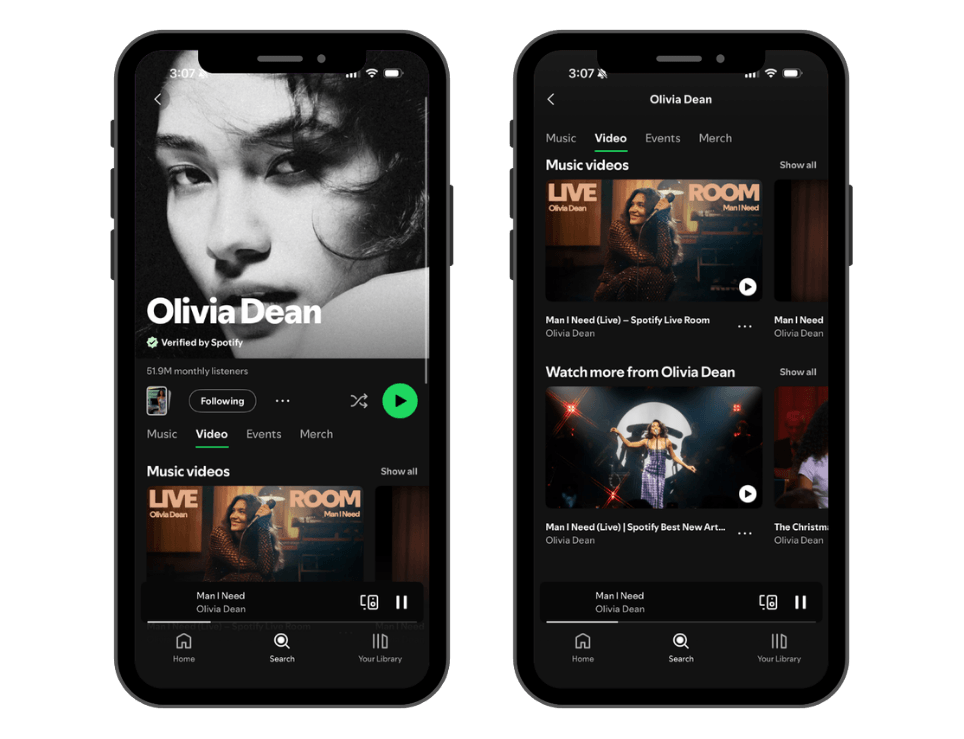
Spotify Full-Length Videos allow eligible artists to upload complete video content that appears alongside their music inside Spotify.
Unlike Canvas, which loops for a few seconds, full-length videos can include:
- Official music videos
- Live performances
- Studio sessions
- Acoustic performances
- Cover performances
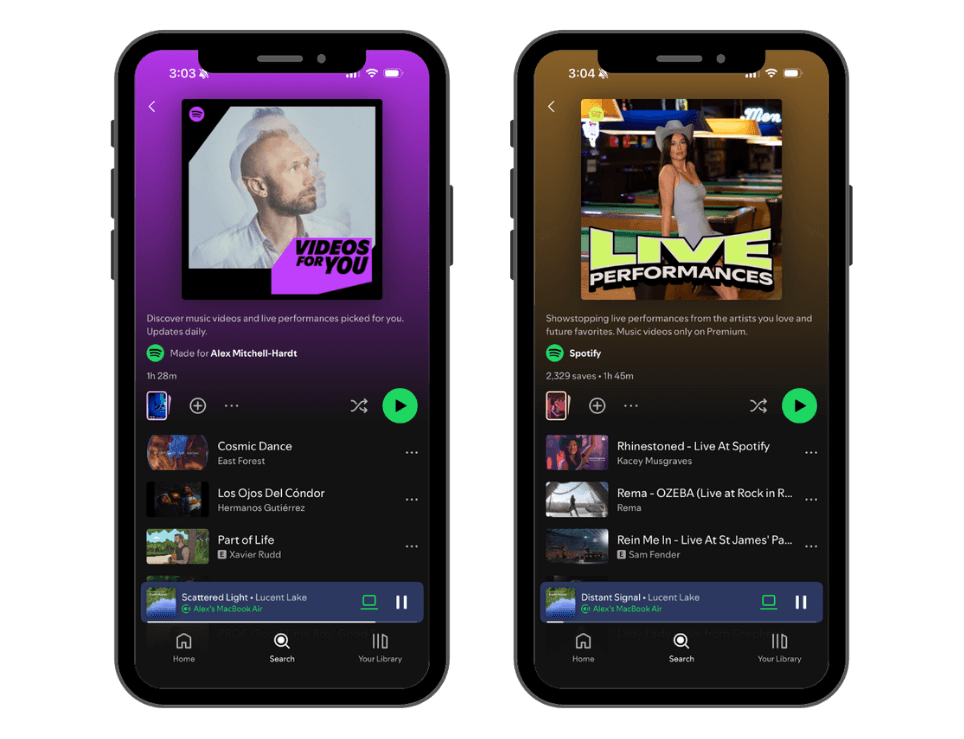
These videos can appear throughout Spotify, including:
- Artist profiles
- Album and single pages
- Search
- Recommendations
- Playlists
- The new Video tab
Rather than treating video as a separate experience, Spotify is integrating it directly into music discovery.
Who Can Upload Videos?
At the time of writing, Spotify’s direct upload feature is still in beta.
Eligible artists can upload videos directly through Spotify for Artists.
If you don’t currently have access, you can join Spotify’s waitlist while the company expands availability.
Why Is Spotify Investing So Heavily in Video?
Over the past few years Spotify has introduced:
- Canvas
- Countdown Pages
- Clips
- Video podcasts
- Music videos
- Full-length artist uploads
The goal is clear.
Instead of listeners leaving Spotify to watch content elsewhere, Spotify wants fans to stay engaged within its own ecosystem.
For artists, that creates additional opportunities to earn streams, followers, saves, and shares from people who are already listening.
Do Videos Actually Increase Streams?
According to Spotify’s own data, yes.
Spotify reports that after listeners watch a video they are:
- 34% more likely to stream that song again the following week.
- 24% more likely to save or share the track.
- 64% more likely to stream the song over the next three weeks.
- 57% more likely to stream more of the artist’s catalog.
While every artist’s results will differ, these numbers suggest that video doesn’t simply entertain fans. It encourages deeper engagement with your music.
Related Article: How Many Streams Do You Need to Go Gold or Platinum?
What Videos Should Artists Upload?
Many artists immediately think about expensive music videos.
That’s only one option.
In many cases, lower-budget content can perform just as well because fans appreciate authenticity.
1. Official Music Videos
These remain your flagship visual asset and should usually be uploaded first.
Best for:
- New singles
- Album launches
- Press campaigns
2. Live Performances
Fans love seeing how songs sound outside the studio.
Ideas include:
- Studio live sessions
- Rooftop performances
- Acoustic concerts
- Festival performances
These often feel more personal than polished music videos.
3. Acoustic Versions
Acoustic performances give fans a fresh reason to revisit songs they’ve already heard.
They also highlight songwriting and musicianship.
4. Studio Sessions
Recording footage has become increasingly popular.
Examples include:
- Recording vocals
- Tracking drums
- Guitar sessions
- Producer breakdowns
If you’re already paying for studio time, capturing video creates valuable content with very little additional cost.
5. Cover Performances
Cover songs remain one of the best discovery tools for developing artists.
If you already have permission to release a cover, pairing it with video gives fans another way to discover your work.
Related Article: How to Get Better Artists in Your Spotify “Fans Also Like” Section
What Can’t You Upload?
Spotify currently has several restrictions.
At the time of writing, unsupported content includes:
- Lyric videos
- Visualizers
- Concert films spanning multiple songs
- Videos without accompanying music
Always review Spotify’s latest video specifications before uploading.
Should Every Artist Use Spotify Videos?
Not necessarily.
Here’s a simple guideline.
Definitely upload videos if you:
- Already produce music videos
- Record live performances
- Release music consistently
- Have an engaged fanbase
- Want to increase Spotify engagement
You can probably wait if:
- You rarely release music
- Video production would significantly delay releases
- Your budget is extremely limited
For most independent artists, releasing another great song is still more important than producing an expensive video.
Related Article: How to Get Verified on Spotify: Complete Step-by-Step Artist Verification Guide
The Best Release Strategy
One mistake many artists make is releasing everything on the same day.
Instead, stretch your content over several weeks.
Example rollout
Week 0
Release the single.
Week 1
Upload the official music video.
Week 3
Release an acoustic performance.
Week 5
Publish a live session.
Week 7
Upload behind-the-scenes studio footage.
Instead of one day of promotion, you’ve created nearly two months of fresh content around the same song.
Can You Reuse Your YouTube Videos?
Yes.
If you own the rights to your video, there’s no reason it should only live on YouTube.
Many artists already have:
- Music videos
- Live performances
- Acoustic sessions
Uploading these existing assets to Spotify allows them to work harder without creating entirely new content.
Do You Need an Expensive Music Video?
No.
Some of the most engaging music content today is intentionally simple.
Ideas that don’t require a massive budget include:
- One-camera live performances
- Studio recording sessions
- Acoustic takes
- Rehearsal footage
- Performance videos filmed with a small crew
Consistency often matters more than production value.
Spotify Videos vs. YouTube
Many artists wonder whether Spotify is trying to compete directly with YouTube.
The platforms serve different purposes.
YouTube
- Search-driven discovery
- Long-form content
- Monetization through ads
- Massive public audience
Spotify
- Existing music listeners
- Higher listening intent
- Built around songs and albums
- Encourages additional streams
Rather than replacing YouTube, Spotify gives artists another place to reach fans who are already listening to their music.
The smartest artists will likely use both.
Common Mistakes to Avoid
Uploading one video and forgetting about it
Think of video as an ongoing content strategy, not a one-time event.
Spending your entire budget on one production
One filming day can produce:
- Official video
- Live performance
- Acoustic version
- Behind-the-scenes footage
- Short-form social clips
Creating multiple assets usually delivers a better return than investing everything into a single video.
Ignoring older songs
Your catalog deserves attention too.
Adding new videos to older releases can encourage fans to rediscover music you’ve already released.
How to Upload Full-Length Videos to Spotify
If you have access to Spotify’s beta video upload feature, you can upload videos directly through Spotify for Artists in just a few minutes.
Step 1: Open Spotify for Artists
Log in to your Spotify for Artists account on desktop and navigate to the Videos section. If your account has access to the beta, you’ll see the option to upload a new video.
Step 2: Upload Your Video
Select Upload Video and choose the video file from your computer.
Before uploading, make sure:
- You own or control all rights to the video.
- The video meets Spotify’s technical specifications.
- The audio matches the official recording on Spotify.
- Your video follows Spotify’s content guidelines.
Step 3: Choose the Song
Next, select which song the video should be associated with.
The video will appear alongside that track across Spotify, including on your artist profile and other supported surfaces.
Step 4: Add Metadata
Complete the required information, including:
- Video title
- Description (if applicable)
- Language
- Copyright information
- Rights ownership
Accurate metadata helps Spotify process and display your content correctly.
Step 5: Submit for Review
Once everything looks good, submit your video for review.
Spotify will review the upload to ensure it meets its technical requirements and content policies before it goes live.
Approval times can vary, so don’t wait until release day if you’re planning to include video as part of a launch.
Best Practices Before You Upload
To maximize the impact of your videos:
- Upload in the highest quality available.
- Use professional thumbnails when supported.
- Match the video’s audio exactly to the Spotify recording.
- Upload videos shortly after releasing a new single to extend momentum.
- Promote the video on social media once it goes live.
Frequently Asked Questions
Are Spotify full-length videos available to everyone?
No. The feature is currently rolling out through a beta program, with additional artists gaining access over time.
Do artists earn royalties from Spotify videos?
Yes. Spotify states that eligible video streams are royalty-bearing.
Can I upload videos without a distributor?
If you have access to Spotify’s beta upload feature, yes.
Can I upload the same video that’s on YouTube?
Yes, provided you own or control the necessary rights and the video meets Spotify’s specifications.
Should small artists bother with Spotify videos?
If you already have quality video content, absolutely. If creating videos would significantly delay releasing new music, prioritize consistently putting out great songs first.
Final Thoughts
Spotify’s move into full-length artist video represents one of its biggest platform changes in recent years.
For artists, the opportunity isn’t simply uploading another music video.
It’s creating a richer experience around every release.
Whether that’s a live performance, an acoustic session, or behind-the-scenes studio footage, video gives fans more ways to connect with your music without ever leaving Spotify.
The artists who consistently combine strong music with compelling visual content will likely be best positioned as Spotify continues expanding its investment in video.
Looking to Promote Your Music?
Try our Spotify Playlist Pitching and TikTok Music Promotion services..