

Now Reading: How to Add Lyrics to Spotify in 2026: Step-by-Step Guide
-
01
How to Add Lyrics to Spotify in 2026: Step-by-Step Guide


Want to get your song lyrics on Spotify? Whether you’re releasing your first single or updating an existing song, adding lyrics to Spotify is relatively easy and can be done for free.
While you can’t upload lyrics directly through Spotify for Artists, you have two options: submit them through your music distributor or use Musixmatch, Spotify’s official lyrics partner.
In this guide, we’ll cover both methods, show you how to sync your lyrics, and explain how to get your lyrics on Apple Music, Instagram, YouTube Music, and other platforms.
How to Add Lyrics to Spotify
There are two ways to add lyrics to Spotify: through a music distributor that supports Spotify lyrics delivery or directly through Musixmatch Pro.
Option 1: Upload Lyrics Through Your Music Distributor
Some music distributors, including DistroKid, offer integrations with Musixmatch that allow artists to submit and sync lyrics directly through their distributor’s dashboard.
Here’s what to do:
- Log in to your music distributor’s dashboard.
- Find the lyrics submission or synchronization feature.
- Confirm Spotify is supported and check for additional fees.
- Enter your lyrics, sync them if supported, and submit.
If your distributor handles Spotify lyrics delivery, you don’t need a separate Musixmatch account.
Note: Some distributors charge extra for this service. For example, DistroKid offers its Musixmatch-powered Lyric Blaster as a paid add-on.
Option 2: Upload Lyrics Directly Through Musixmatch
If your distributor doesn’t support Spotify lyrics delivery or charges an additional fee, you can use Musixmatch Pro directly.
Musixmatch Pro has a free plan that lets verified artists add, edit, and sync lyrics on Spotify. You don’t need a paid subscription for these features.
Here’s how:
- Visit Musixmatch Pro and select the free plan below the paid options.
- Create an account and verify your artist profile using your Spotify artist URL.
- Connect your Spotify account to Musixmatch.
- Find your song and enter its lyrics.
- Submit your lyrics and sync them with your song’s audio.
Once processed, your lyrics should appear on Spotify within a few days.
Musixmatch Pro Free vs. Paid: Which Plan Should You Choose?
For most independent artists, Musixmatch Pro’s free plan is all you need to add, edit, and sync Spotify lyrics.
Paid plans offer additional features, such as expanded content creation tools and professional lyric management services, depending on the plan.
If your main goal is simply getting your lyrics on Spotify, start with the free option. You can always upgrade later if you need additional features.
Compare current plans and pricing on the Musixmatch Pro website.
Do Music Distributors Automatically Upload Lyrics to Spotify?
Not necessarily. Distributing your music and distributing your lyrics are two different things.
Some distributors, such as DistroKid, offer Spotify lyrics delivery through Musixmatch, while others require you to submit lyrics separately.
Even if your song is already live on Spotify, its lyrics won’t necessarily appear automatically.
Check whether your distributor supports Spotify lyrics delivery. If not, you can submit them directly through Musixmatch Pro for free without re-uploading your music.
How to Add Lyrics to Spotify Using Musixmatch Pro: Step-by-Step Guide
If you’re using Musixmatch directly instead of submitting lyrics through your distributor, follow these steps to get your lyrics on Spotify.
Step 1: Create a Free Musixmatch Pro Account
Visit Musixmatch Pro and select the free plan below the paid options.
Create an account using an email address associated with your artist, label, or management company to help speed up verification.
Step 2: Verify Your Artist Profile
Before submitting lyrics, you’ll need to verify your artist profile.
From your Musixmatch Pro dashboard:
- Navigate to “Roster” and select “Add Artist.”
- Enter your Spotify artist profile URL.
- Complete the required information and submit.
Musixmatch typically reviews verification requests within a few business days.
Don’t have access to your Spotify artist profile yet? Read our guide on how to claim your artist page on Spotify, Apple Music, and other streaming services.
Step 3: Connect Your Spotify Account
Connect your Spotify account to Musixmatch Pro to access your music and manage lyrics.
If you have Spotify Premium, Musixmatch can automatically match your Spotify catalog and retrieve audio for synchronization.
Spotify Premium isn’t required. You can still submit lyrics and upload audio manually when needed.
Step 4: Find Your Song on Musixmatch
From your Musixmatch Pro dashboard:
- Open “Roster” and select your artist profile.
- Find your song under the “To Do” or “Music” tab.
- Select “Lyrics” to open the editor.
If your song isn’t listed, go to “Music > Add Missing Release” to add it manually. According to Spotify, this can take up to 48 hours.
Step 5: Add and Submit Your Lyrics
Enter your complete song lyrics into the Musixmatch editor, making sure they match the recording.
Before submitting, check for spelling mistakes, missing lines, repeated choruses, and incorrect words. Follow Musixmatch’s formatting guidelines, including its supported section tags.
Once everything looks correct, click “Send” to submit your lyrics.
Spotify says changes typically take a few days to appear. You can check their status by opening your song on Spotify and viewing the lyrics.
Want your lyrics to scroll and highlight as your song plays? You’ll also need to synchronize them, which we’ll cover next.
How to Sync Lyrics on Spotify
Synced lyrics automatically scroll and highlight as a song plays on Spotify, allowing listeners to follow along in real time.
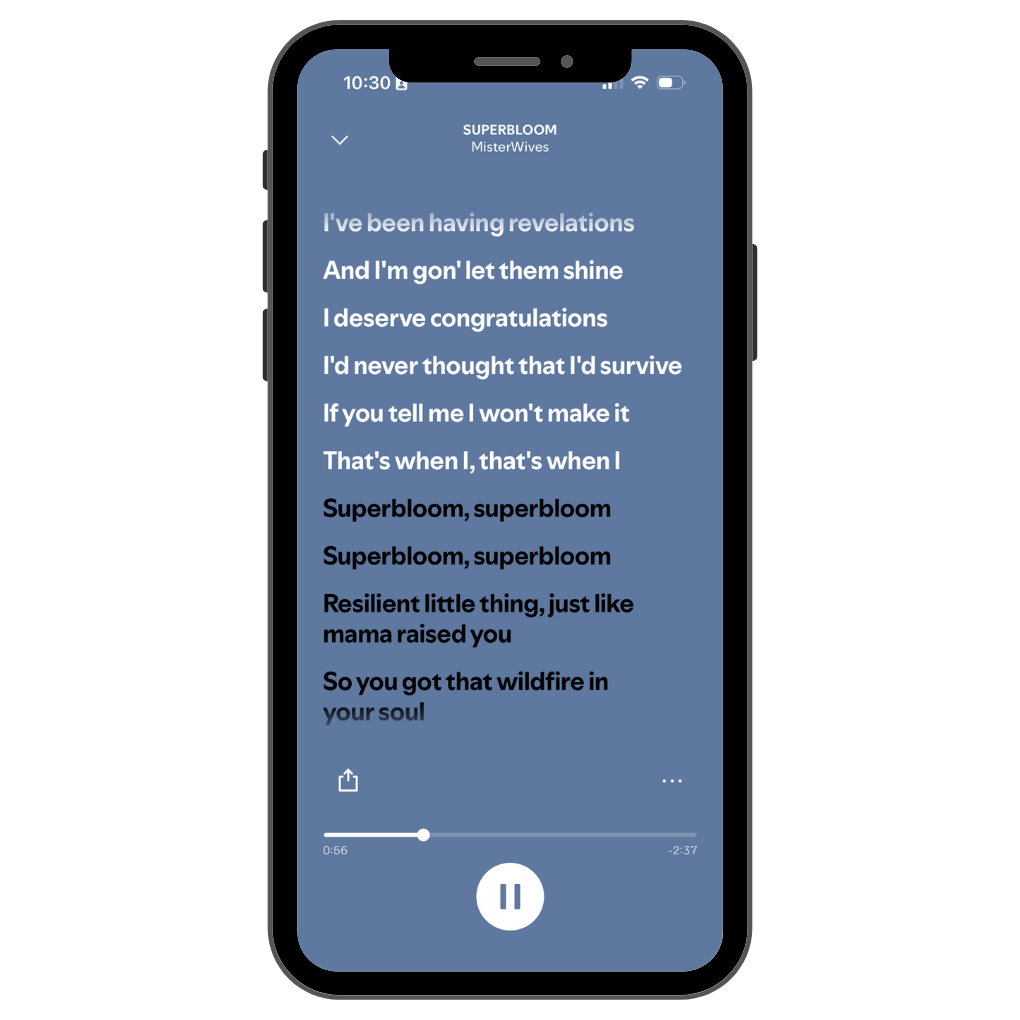
You can sync your Spotify lyrics through a supported music distributor or directly through Musixmatch Pro.
How to Sync Lyrics Through Your Music Distributor
If your distributor supports Spotify lyrics synchronization, you can manage the process through its dashboard.
- Log in to your distributor’s dashboard.
- Find the synced lyrics feature and select your song.
- Follow the instructions to match your lyrics with the audio.
- Submit your synced lyrics to Spotify.
For example, DistroKid offers Spotify lyrics synchronization through its paid Lyric Blaster service, powered by Musixmatch. You’ll need to submit and get approval for your plain lyrics before syncing them.
Not all distributors support this feature, and some charge additional fees.
How to Sync Lyrics Using Musixmatch Pro
If you’re using Musixmatch directly, follow these steps:
- Log in to Musixmatch Pro and open “Roster.”
- Find your song under “To Do” or “Music.”
- Select “Sync.”
- Play your song and adjust each lyric line’s timing to match the vocals.
- Review and click “Send” to submit.
Spotify Premium users can automatically access their song’s audio through Musixmatch. Otherwise, you can upload an audio file manually.
Tips for Accurate Lyric Synchronization
- Sync each line when its first word is sung.
- Prioritize lead vocals when multiple voices overlap.
- Check repeated choruses and review the entire song before submitting.
How to Format Your Song Lyrics Correctly
Proper formatting helps prevent rejected submissions and ensures your lyrics display correctly on Spotify and other platforms.
Follow these guidelines:
- Write out every verse and chorus, including repeated sections. Don’t use shortcuts like “(Chorus x2).”
- Use proper line breaks to separate lyrics and song sections.
- Follow your provider’s formatting rules. Musixmatch uses tags like #VERSE and #CHORUS, while some distributors prohibit section labels.
- Match the recording exactly, including explicit language and differences between clean and explicit versions.
- Check spelling, capitalization, and punctuation before submitting.
Tip: Keep a finalized copy of your lyrics alongside your song titles, artist credits, and other release information. Our music metadata guide covers everything you should double-check before distributing your music.
How Long Does It Take for Lyrics to Appear on Spotify?
Lyrics submitted directly through Musixmatch typically appear on Spotify within a few days. Submissions through music distributors may take longer.
| Submission Method | Estimated Time |
|---|---|
| Musixmatch artist verification | A few business days |
| Adding a missing release to Musixmatch | Up to 48 hours |
| Lyrics submitted through Musixmatch | A few days |
| Lyrics submitted through DistroKid | 1–2 weeks |
These are estimates, not guaranteed publishing times.
Why Aren’t My Lyrics Showing on Spotify?
If your lyrics aren’t appearing on Spotify, check the following:
- Submission status: Confirm your lyrics were submitted successfully through Musixmatch or your distributor.
- Artist verification: If using Musixmatch directly, make sure your artist profile is verified.
- Song information: Check that your lyrics are associated with the correct release.
- Processing time: Allow a few days for Musixmatch submissions or your distributor’s estimated delivery window.
- Formatting errors: Incorrect formatting, missing lines, or synchronization issues can cause problems.
If your lyrics still aren’t showing, contact the distributor or lyrics provider you used to submit them.
How to Add Lyrics to Apple Music
Apple Music allows artists to submit song lyrics through their music distributor or directly through Apple Music for Artists.
Several popular distributors deliver lyrics to Apple Music, so check whether yours supports this feature before submitting them separately.
Which Music Distributors Upload Lyrics to Apple Music?
Here’s how popular music distributors handle Apple Music lyrics:
| Distributor | Apple Music Lyrics Support |
|---|---|
| DistroKid | Plain lyrics included with all plans; synced lyrics with Musician Plus and Ultimate |
| TuneCore | Plain lyrics delivered directly |
| Ditto Music | Lyrics submitted through the Release Builder |
| Symphonic | Plain lyrics submitted through SymphonicMS |
| Amuse | Lyrics submitted during release upload |
| CD Baby | Uses third-party providers such as Musixmatch and LyricFind |
| RouteNote | Does not support lyrics submission through its release uploader |
These services have different capabilities, particularly for synchronized lyrics. You can also explore Apple Music’s distributor directory for additional providers.
How to Upload Lyrics Through Your Distributor
If your distributor supports Apple Music lyrics delivery:
- Log in to your distributor’s dashboard.
- Find the lyrics field or submission feature for your song.
- Enter your formatted lyrics and submit them for delivery to Apple Music.
The exact process varies by distributor. Some allow lyrics to be submitted during the initial release upload, while others offer a separate lyrics dashboard.
How to Upload Lyrics Directly Through Apple Music for Artists
If your distributor doesn’t support lyrics delivery, you can submit them directly:
- Sign in to Apple Music for Artists. If you haven’t claimed your artist page, your music must be live for at least five business days before you can request access.
- Open “Artist Content” and select your song.
- Click “Add Lyrics” and paste your lyrics into the “Song Lyrics” field.
- Review the formatting and submit.
Apple requires proper line breaks, capitalization at the beginning of each line, and no periods or commas at the ends of lines. Repeated verses and choruses must be written out completely.
To correct existing lyrics, select your song under “Artist Content” and click “Request a Change” in the Lyrics section.
How to Add Synced Lyrics to Apple Music
Apple Music supports both standard and time-synced lyrics, but not all distributors offer synchronization.
For example, DistroKid supports synced lyrics delivery to Apple Music for artists on its Musician Plus and Ultimate plans. TuneCore and Symphonic currently deliver plain lyrics without synchronization.
If your distributor doesn’t support synced lyrics, check whether a separate lyrics provider offers this service. Submitting synced lyrics does not guarantee they will appear in the synchronized format on Apple Music.
For more details, see Apple Music’s official lyrics submission guide.
How to Add Lyrics to Instagram, YouTube Music, and Other Platforms
Instagram, Facebook, YouTube Music, and Tidal also support song lyrics, but uploading lyrics to one platform doesn’t guarantee they’ll appear everywhere.
Some music distributors handle lyrics delivery directly, while others require you to use a third-party service like Musixmatch.
How to Add Song Lyrics to Instagram and Facebook
Instagram allows users to display synchronized song lyrics in Stories using the music sticker. To make your lyrics available, your song must be in Instagram’s music library and its synced lyrics must be delivered through a supported provider.
First, check whether your distributor offers this service.
For example, DistroKid delivers synced lyrics to Instagram and Facebook through its paid Lyric Blaster service, powered by Musixmatch.
If your distributor doesn’t support lyrics delivery to Instagram, you can submit them directly through Musixmatch Pro:
- Create an account and verify your artist profile.
- Find your song and add its lyrics.
- Sync the lyrics with your audio.
- Submit them for processing.
Once available on Instagram, fans can display your synchronized lyrics when sharing your song in Stories.
How to Add Lyrics to YouTube Music
YouTube Music supports both plain and synchronized lyrics. Artists can submit lyrics through supported music distributors or lyrics providers.
For example, DistroKid delivers plain lyrics to YouTube Music with all plans and synced lyrics with Musician Plus and Ultimate subscriptions.
If your distributor doesn’t support YouTube Music lyrics, check whether a provider such as Musixmatch or LyricFind can deliver them.
Keep in mind that YouTube Music lyrics are different from captions on regular YouTube videos. Adding captions to a music video won’t automatically add lyrics to its YouTube Music listing.
Which Music Distributors Support Lyrics on These Platforms?
Here’s a comparison of popular music distributors and their lyrics delivery options:
| Distributor | Lyrics Delivery Options |
|---|---|
| DistroKid | YouTube Music plain and synced lyrics; Instagram, Facebook, and Tidal synced lyrics through paid Lyric Blaster |
| TuneCore | Directs artists to Musixmatch for Instagram and Facebook lyrics |
| Ditto Music | Directs artists to Musixmatch for Instagram lyrics |
| Symphonic | Offers static lyrics delivery and a Musixmatch partnership for additional platforms |
| Amuse | Offers fast-track Musixmatch Pro verification for lyrics on platforms including Instagram |
| CD Baby | Recommends third-party providers such as Musixmatch and LyricFind |
Tidal also receives its lyrics from Musixmatch, so artists can use Musixmatch directly or a distributor service that supports delivery to Tidal.
Lyrics availability varies by distributor, subscription plan, and platform. Always confirm which destinations your distributor supports before submitting.
How to Add Spotify Lyrics Through DistroKid, TuneCore, and CD Baby
The process for adding Spotify lyrics depends on your music distributor. Here’s how it works with three popular services.
How to Add Spotify Lyrics Through DistroKid
DistroKid offers Spotify lyrics delivery through Lyric Blaster, a paid service powered by Musixmatch.
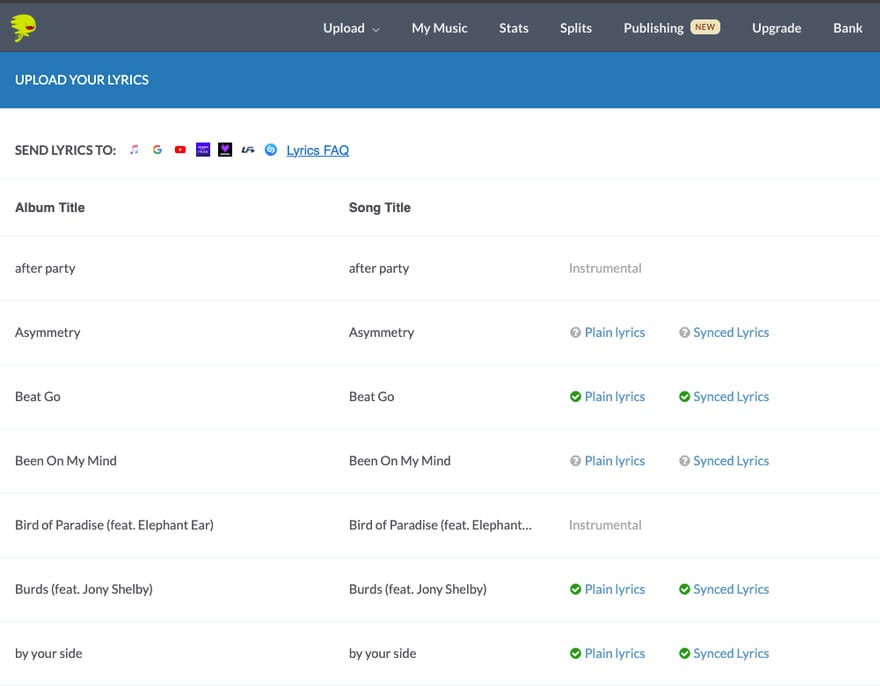
- Log in to DistroKid and open your lyrics dashboard.
- Select your song and submit its plain lyrics.
- Opt into Lyric Blaster for your artist.
- Once your plain lyrics are approved, select “Synced Lyrics” to synchronize and submit them.
You can also skip the paid Lyric Blaster service and submit your Spotify lyrics directly through Musixmatch Pro’s free plan.
How to Add Spotify Lyrics Through TuneCore
TuneCore currently delivers plain lyrics to Apple Music but doesn’t offer direct Spotify lyrics delivery.
To get your lyrics on Spotify, create a free Musixmatch Pro account, verify your artist profile, and submit your lyrics there.
How to Add Spotify Lyrics Through CD Baby
CD Baby doesn’t directly distribute lyrics to Spotify. Instead, it recommends third-party providers like Musixmatch and LyricFind.
If you use CD Baby, you can submit your Spotify lyrics through Musixmatch Pro without changing distributors or re-uploading your music.
How to Change or Fix Incorrect Lyrics on Spotify
If your Spotify lyrics contain incorrect words, missing lines, or synchronization errors, you can update them through your music distributor or Musixmatch Pro.
How to Edit Spotify Lyrics Through Your Distributor
If you submitted your lyrics through a distributor like DistroKid, return to its lyrics dashboard, select your song, and correct the text or synchronization before resubmitting.
The process and update times vary by distributor.
How to Fix Spotify Lyrics Using Musixmatch
If you submitted your lyrics directly through Musixmatch:
- Log in to Musixmatch Pro and open “Roster.”
- Select your song under “To Do” or “Music.”
- Click “Lyrics,” make your corrections, and select “Send.”
If your lyrics are out of sync, select “Sync” instead to adjust their timing.
Changes submitted through Musixmatch typically take a few days to appear on Spotify.
Note: Spotify uses PetitLyrics to manage lyrics for listeners in Japan.
Why Independent Artists Should Add Lyrics to Their Songs
Adding lyrics to your music helps listeners connect with your songs and makes your releases more accessible and engaging.
Here are three benefits:
- Better listening experience: Accurate, synchronized lyrics help fans understand your words, follow along, and sing along.
- More social sharing opportunities: Synced lyrics on platforms like Instagram make it easier for fans to share their favorite lines in Stories.
- Greater control over your music: Submitting your lyrics helps ensure they’re accurate and consistent across streaming platforms.
Making lyrics available should be part of every independent artist’s release checklist, alongside artwork, metadata, and music promotion.
Frequently Asked Questions About Spotify Lyrics
Can I Upload Lyrics Directly to Spotify?
No. Spotify doesn’t allow artists to upload lyrics through Spotify for Artists. You can submit them through a music distributor that supports Spotify lyrics delivery or directly through Musixmatch Pro.
Can I Add Lyrics to Spotify for Free?
Yes. Musixmatch Pro offers a free plan that lets verified artists add, edit, and sync Spotify lyrics. Paid plans offer additional features but aren’t required for basic lyrics management.
Does DistroKid Automatically Add Lyrics to Spotify?
No. DistroKid offers Spotify lyrics delivery through its paid Lyric Blaster service, powered by Musixmatch. Alternatively, you can submit lyrics directly through Musixmatch Pro for free. TuneCore and CD Baby also recommend third-party services for Spotify lyrics.
How Long Does It Take for Lyrics to Appear on Spotify?
Lyrics submitted through Musixmatch typically appear within a few days. Distributor submissions may take longer. For example, DistroKid estimates approximately 1–2 weeks for lyrics delivery.
Why Aren’t My Lyrics Showing on Spotify?
Common reasons include processing delays, incomplete artist verification, incorrect song information, or unsuccessful submissions. Check your distributor or Musixmatch dashboard to confirm your lyrics were submitted correctly.
How Do I Get Synced Lyrics on Spotify?
Use Musixmatch Pro’s Sync feature or a distributor that supports synced Spotify lyrics. Match each lyric line to the song’s audio and submit it for processing.
Do I Need Spotify Premium to Add Lyrics?
No. Spotify Premium isn’t required to add or sync lyrics. However, connecting a Premium account allows Musixmatch to automatically retrieve your song’s audio for synchronization.
Can I Add Lyrics to Spotify Before My Song Is Released?
You can prepare lyrics before release, but submitting them depends on your distributor or Musixmatch having access to the song. Lyrics aren’t guaranteed to appear on release day.
How Do I Change Incorrect Lyrics on Spotify?
If you submitted through Musixmatch Pro, select your song under “Roster,” edit the lyrics, and click “Send.” If you used your distributor, make corrections through its lyrics dashboard.
Does Genius Provide Lyrics to Spotify?
No. Spotify uses Musixmatch for its licensed and synchronized lyrics. Adding lyrics to Genius doesn’t automatically make them appear on Spotify.
Before your next release, check which streaming platforms your distributor sends lyrics to. If there are gaps, services like Musixmatch can help you get your lyrics where they need to be.
It’s a small step that makes it easier for fans to follow along, sing your songs, and share their favorite lines.
Looking to Promote Your Music?
Try our Spotify Playlist Pitching and TikTok Music Promotion services.